
IAE Academy

GATE 2020 EC Q.10: solution and answer

GATE 2020 · ECQ.10 · 1 mark · MCQ

The figure below shows a multiplexer where and are the select lines, to are the input data lines, EN is the enable line, and is the output. is
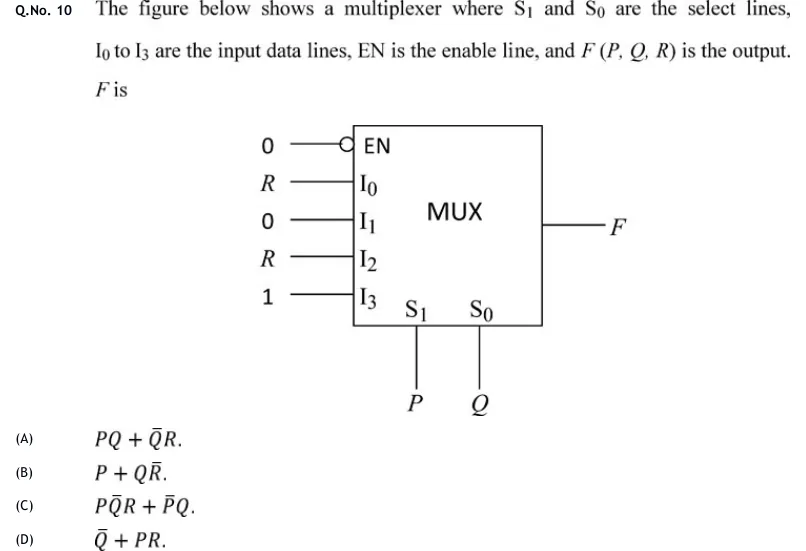
GATE 2020 EC question 10: A 4-to-1 MUX block.Tap to open full size
Figure from the GATE 2020 EC paper. It is part of the question.
Figure description

A 4-to-1 MUX block. Enable input EN has an inversion bubble (active-low) and is tied to logic 0. Data inputs: I_0 = R, I_1 = 0, I_2 = R, I_3 = 1. Select lines on the bottom: S_1 = P, S_0 = Q. Single output F on the right.

  1. (A)

    .

  2. (B)

    .

  3. (C)

    .

  4. (D)

    .

Answer and solution

ANSWER

, so the answer is option (A).

Official answer: ASource: Official answer key, GATE 2020 EC (IIT Delhi)

  1. The EN input has an inversion bubble, so it is active-low. It is tied to 0, so the MUX is enabled and works as a normal 4-to-1 multiplexer.

  2. Output of a 4-to-1 MUX (complement written with ):

  3. Substitute , , , , , :

  4. Combine the two terms using : .

  5. So , which is option (A).

  6. Checking the other options against the MUX directly: with the MUX selects , but (B) . With the MUX selects , but (C) . With the MUX selects , but (D) . So (B), (C) and (D) are all wrong, and (A) is the answer.

KEY IDEA

A MUX output is the sum of each minterm of the select lines ANDed with the data input on that line. Take the enable first: an active-low EN tied to 0 means the MUX is enabled. Then write with (the MSB) and , and simplify.

WATCH OUT FOR

Two mistakes are common. The first is reading EN = 0 as 'disabled' (output stuck at 0) and missing the bubble that makes EN active-low. The second is swapping the select lines, taking as the MSB. That sends and to the wrong minterms and gives , which is not among the options.

From the GATE 2020 EC paper. Every question of this paper · Download the full paper · All 12 Combinational questions, with notes

More Combinational questions